

Opal Ad Pay Explained
TL;DR: Opal Ad Pay is a waitlist-only feature that lets high-spending ad teams pay Meta and Google invoices with a credit card, extend cash flow by up to 55 days, and earn 1% cashback on every dollar.
Meta and Google moved most high-volume advertisers off direct credit card billing years ago. The result: teams are stuck with bank transfers that take three days to clear, manual invoice tracking, and cash flow gaps that have nothing to do with campaign performance. Opal Ad Pay is built to fix that.
Key takeaways:
Opal automatically detects Meta and Google invoices from your inbox. No manual uploads.
You can pay with Opal credit or any connected card, and switch per invoice.
Cash flow extends up to 55 days, so you pay after results come in, not before campaigns run.
The fee is 3% with Opal credit (net effective cost of 2% after 1% cashback) or 3.5% with a connected card.
Why Ad Pay Exists
Once your monthly ad spend crosses a certain threshold, Meta and Google stop letting you pay with a credit card directly. They switch you to invoice billing, which means ACH bank transfers with multi-day processing windows.
That creates two problems. First, a cash flow gap: you are funding ad spend before you know whether campaigns performed. Second, an operational one: every invoice has to be tracked, matched, and paid manually. Miss a due date and your campaigns pause.
Ad Pay exists because the platforms removed a payment option that worked, and nothing replaced it at scale.
What Ad Pay Actually Does
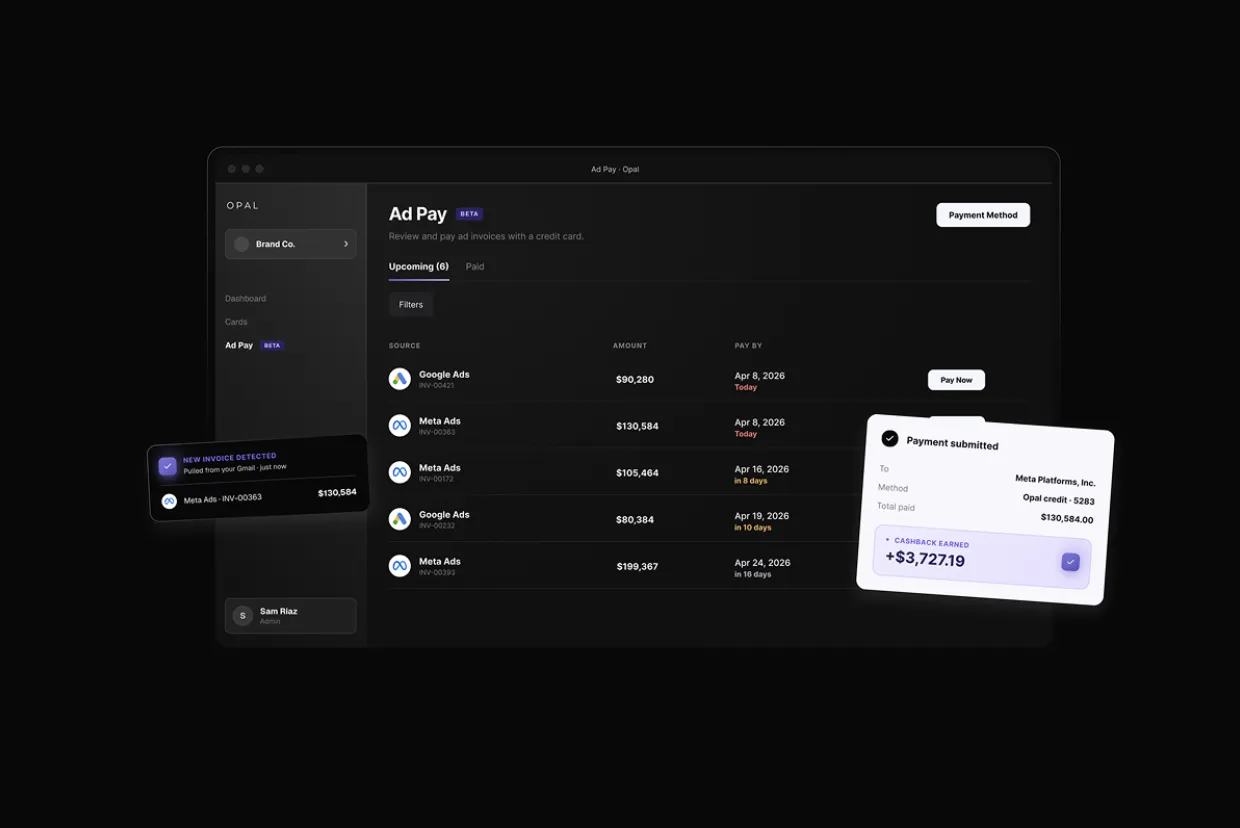
Opal Ad Pay sits between your ad accounts and the platforms. It detects your invoices automatically, lets you pay them using Opal credit or a connected card, and handles the transfer to Meta or Google on your behalf.
From your side, it looks like a single dashboard where all your invoices appear, with due dates, amounts, and platform details already populated. You review, schedule, and pay. Opal handles the rest.
Two outcomes follow from that:
-
Cash flow extension: Paying with Opal credit gives you up to 55 days before the balance is due. That means campaigns run on Opal's credit line while your working capital stays in your account.
-
Cashback on ad spend: Every dollar paid through Opal earns 1% cashback, something that invoice billing through bank transfer has never offered.
How It Works in Three Steps
Step 1: Connect your ad account email
You connect the email address associated with your Meta and Google ad accounts. Opal reads your inbox and automatically detects invoices as they arrive. There are no manual uploads, no CSV imports, and no copy-pasting invoice numbers.
Step 2: Review detected invoices
Invoices appear in your Opal dashboard with due dates, amounts, and platform details already filled in. You can see everything at a glance and decide what to pay and when.
Step 3: Pay with one click
Choose Opal credit or a connected card on a per-invoice basis. Opal processes the payment and sends it directly to Meta or Google. No bank transfer. No three-day wait. No risk of a campaign pausing because a wire did not clear in time.
What You Earn and What It Costs
Ad Pay has a straightforward fee structure depending on which payment method you use.
Bank Transfer |
Credit Card Direct |
Opal Ad Pay |
|
|---|---|---|---|
|
Payment method |
ACH / wire |
Not available at scale |
Opal credit or connected card |
|
Cash flow extension |
None |
Up to 30 days (when available) |
Up to 55 days |
|
Campaign interruption risk |
High (3-day clearing) |
Low |
Low |
|
Cashback earned |
None |
Varies by card |
1% on every dollar |
|
Invoice management |
Manual |
Manual |
Automatic detection and dashboard |
Fee breakdown:
-
Opal credit: 3% processing fee. You earn 1% cashback on the payment, which brings the net effective cost down to 2%.
-
Connected card: 3.5% processing fee. Cashback depends on your card's own rewards program.
To be precise about the math: the cashback rate is 1%, not 2%. The 2% figure refers to the net cost after that cashback is applied to the 3% fee. Both numbers matter and they are not the same thing.
Who Ad Pay Is Built For
Ad Pay is currently available by waitlist, and it is designed for teams spending $50,000 or more per month on Meta and Google Ads. At that volume, the platforms have almost certainly moved you to invoice billing, which means the problems Ad Pay solves are already your daily reality.
It is a particularly strong fit for:
-
Performance marketing teams running always-on campaigns where a three-day payment delay has real business consequences
-
Agency operators managing multiple client ad accounts and dealing with invoice reconciliation across platforms
-
In-house media teams that need to preserve working capital while keeping campaigns live and fully funded
FAQ
What is Opal Ad Pay?
Opal Ad Pay is a payment tool that lets marketing teams pay Meta and Google ad invoices using a credit line or connected card, rather than ACH bank transfers. It automatically detects invoices from your inbox, consolidates them in a single dashboard, and processes payments directly to the platforms.
How does Opal Ad Pay extend cash flow?
When you pay with Opal credit, you have up to 55 days before the balance is due. That means your ad spend runs now while your working capital stays in your account longer, giving you time to see results before the payment settles.
Does Opal Ad Pay work for both Meta and Google invoices?
Yes. Ad Pay supports both Meta Ads and Google Ads invoice billing. Connect the email associated with each ad account and Opal will detect invoices from both platforms automatically.
What fees does Opal Ad Pay charge?
Opal charges a 3% processing fee when you pay with Opal credit, or 3.5% when you pay with a connected card. There are no subscription fees or monthly minimums.
How much cashback can you earn through Opal Ad Pay?
Every dollar paid through Opal earns 1% cashback. On the Opal credit payment option, that 1% cashback reduces the effective cost of the 3% fee to a net 2%. The cashback rate itself is 1%.
Teams spending $50,000 or more per month on ads should not be absorbing three-day payment delays, chasing invoices manually, and leaving cashback on the table at the same time. Ad Pay is currently in waitlist access. If that matches where your team is right now, visit opalspend.com/ad-pay to request early access.